
User Tools
Sidebar
niota-docs:niota_grid_config_catalog
Table of Contents
configure table or view to be managed
Any table or view that should be managed by niota must be configured as a so called catalog object. Every catalog object has a unique ID by which this object is referenced later on. See below how to create a catalog object.
- add/edit a record → enter valid values for fields listed below
catalog object
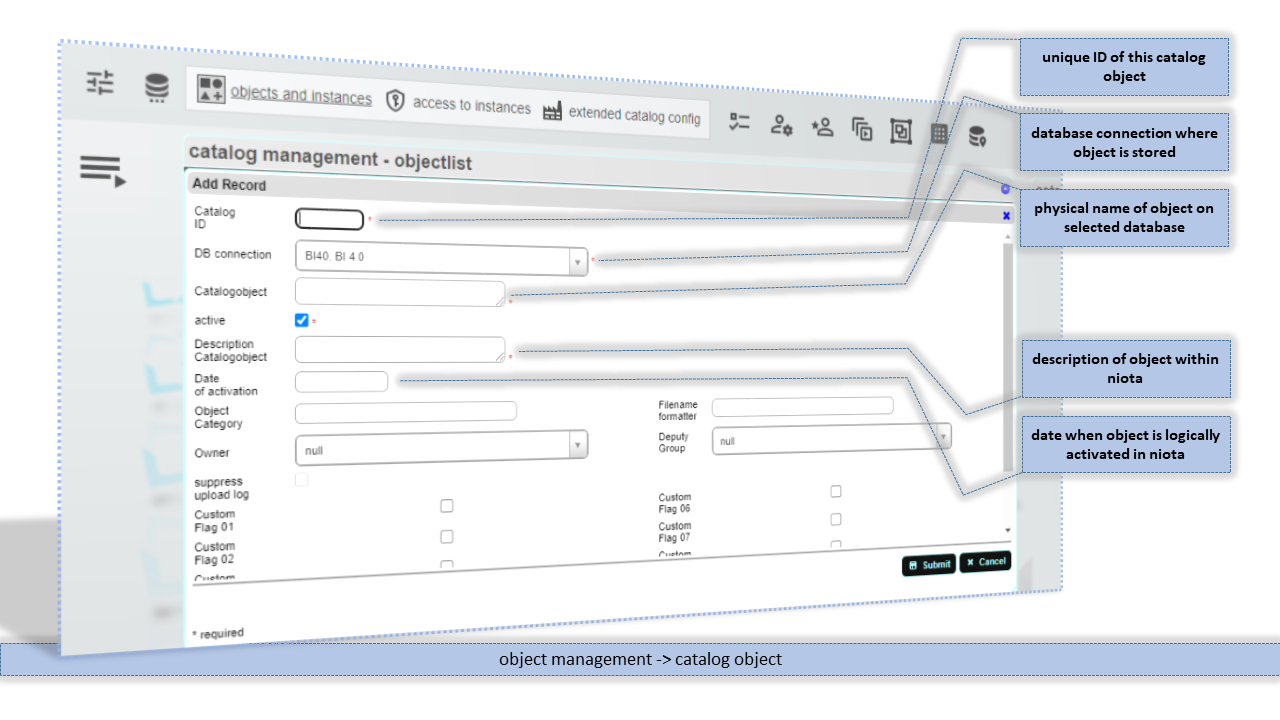
Catalog ID
Unique ID for this catalog object. The catalog object ID for customer objects must be positive integer numbers. Negative integer numbers are reserved for system catalog object.
DB connection
Database connection where object is stored. Via this connection access to the database object is established.
Catalogobject
Physical name of the object on its original source database.
Description Catalogobject
Short description of the object.
Date of activation
Date when object is logically activated in niota. Activation date is optional and not parsed or used anywhere.
Object Category
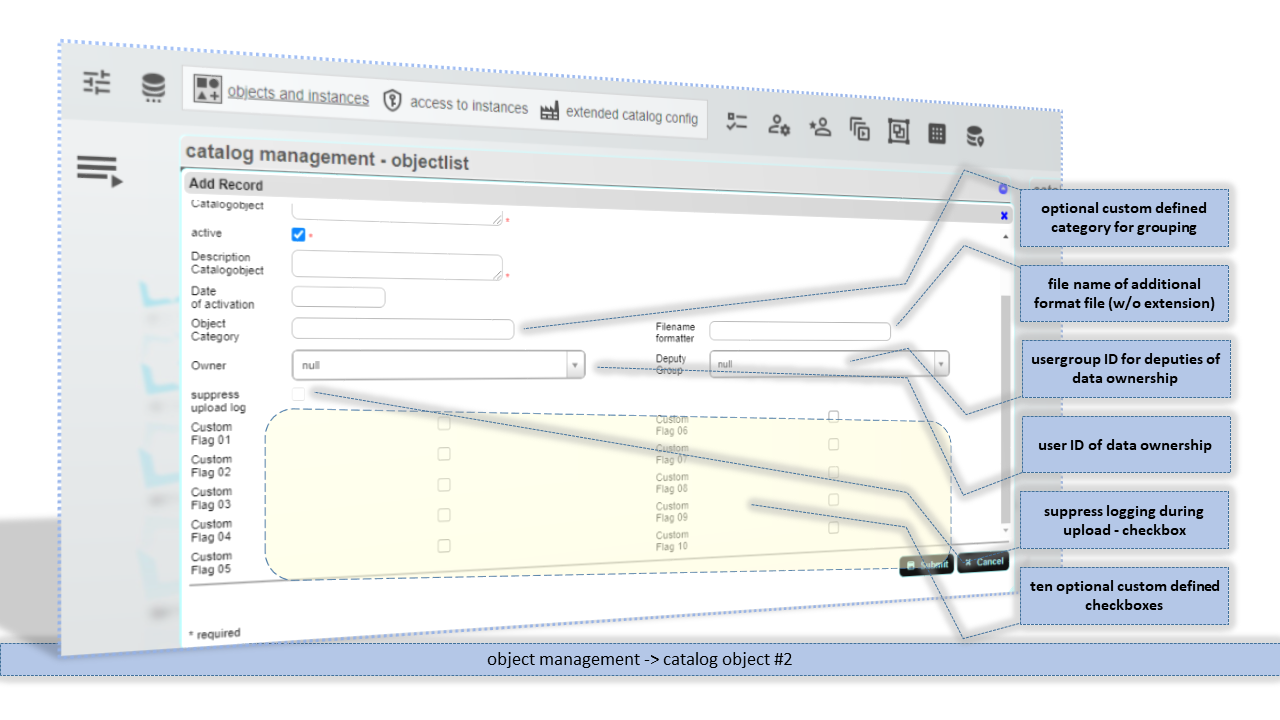
Optional custom defined category to group catalog object by your needs. On grid edit page catalog object can be filtered by object category by default.
Filename formatter
Name of a formatter file without file extions. The formatter file is used to execute format option. The formatter file must be on the server in a subfolder which name matches the name of the database connection for this catalogobject.
Owner
ID of an user account who is the data owner of this catalog object. There are some APIs which return this data owner so it can be used in own scripts.
Deputy Group
ID of an usergroup which is the deputy group for data ownership. There are some APIs which return this deputy group so it can be used in own scripts.
suppress upload log
protected - Checkbox to switch off logging for this object in case table is populated via Excel(R) upload
Custom Flag 01 to Custom Flag 10
Checkboxes for custom use only.
instance of an object
An instance is a default or a configured representation of a catalogobject. By default for every catalog object the *default instance is created. You must not delete the *default instance of an catalogobject.
If you want to have different represenations of a single physical object (table of or view) you can create different instances of this object with totally different settings.

Instance
Logical name for this instance. Do not use * anywhere in the name of your instance. * is a reserved character for system instances.
Description Instance
Description of instance to be used within niota.
Columnlist
List of columns in SQL notation in case not all columns should be selected or in case additional function on columns should be applied. When Join is used the columns must be qualified. See system defaults file for qualifier options.
The use Columnlist checkbox must be on to activate this option.
Read-only-list (deprecated)
Join
Optional (left outer) join condition to another table or view you want to join with the main table. The joined table must be qualified by schema name. When join is used, the columns in columnlist must be qualified as well if column names are ambigeous.
The use Join checkbox must be on to activate this option.
Filter
Filtering condition in SQL where - notation without WHERE keyword.
The use Filter checkbox must be on to activate this option.
Group by
Group by clause in SQL notation without GROUP BY keyword. Group by needs aggregation functions in the column list.
The use Group by checkbox must be on to activate this option.
Order by
Order by clause in SQL notation without ORDER BY keyword.
See system defaults file for default order by options.
Union
Union clause in SQL notation without UNION keyword. Tables in the union clause must be fully qualified as the connection settings are not applied to the union - string.
use Columnlist/Read-only list/Join/Filter/Group by/Order by/Union
Checkboxes to toggle usage of related SQL strings.
use as Grid
Flag to allow this table to be used in grid editor
use as Detail
Flag to allow this table to be used in a master-details scenario as a detail table. If not set, it will not appear in the grid dropdown list for detail tables.
use as Lookup
Flag to allow this table to be used in a lookup scenario as a lookup instance. If not set, it will not appear in the grid dropdown list for lookup tables.
use as Filter
Flag to allow this table to be used in an advanced filter scenario as a filter instance. If not set, it will not appear in the grid dropdown list for filter tables.
Application
ID of an application to which this table is assigned. If there is minimum one table assigned to an application, the application will pop up on application overview page automatically.
Subject area
ID of a subject area to which this table is assigned. Within an application all used subject areas will appear in the second menu bar as tabs.
Iconfile Instance
File of an icon, that is also shown then in the second menu bar.
on/off autoselect
Flag, to autoselect this table in the assigned application/subject area.
Sortorder Subject Area
Relative number of sortorder within a subject area.
A sortorder value -1 will hide the table
Description Subject Area
Alternate description that is displayed in the menu bar when grid is shown in an application/subject area context
Layout ID
ID of an predefined layout. Layout defines e.g. grid display size and allowed features.
Form
ID of a predefined form setting. Form is the element that pops up when a record is edited or inserted.
Gridmode
ID of a predefined gridmode. Gridmode set here overrules edit settings on usergroup level By this you may set here gridmode “VIEW” and prevent this table/view from beeing edited.
on/off Caption overlay
Flag to use different caption text for this table, in case it's used in a master-detail / related table scenario. If on, caption will be set from description of link in master-detail / related table link.
use/ignore Catalog Layout
Flag to ignore/use existing catalog id/table specific layout definition.
Layout ID Catalog Level
ID of the layout that is defined in catalog (object) advanced format. The name here must match the layout ID there.
niota-docs/niota_grid_config_catalog.txt · Last modified: 2025/12/12 13:39 by admin