
User Tools
Sidebar
niota-docs:niota_grid_config_catalog_access
Table of Contents
configure access to instances
With this feature you can configure access for users and usergroups to an existing instance of an catalog object.
- add/edit a record → enter valid values for fields listed below
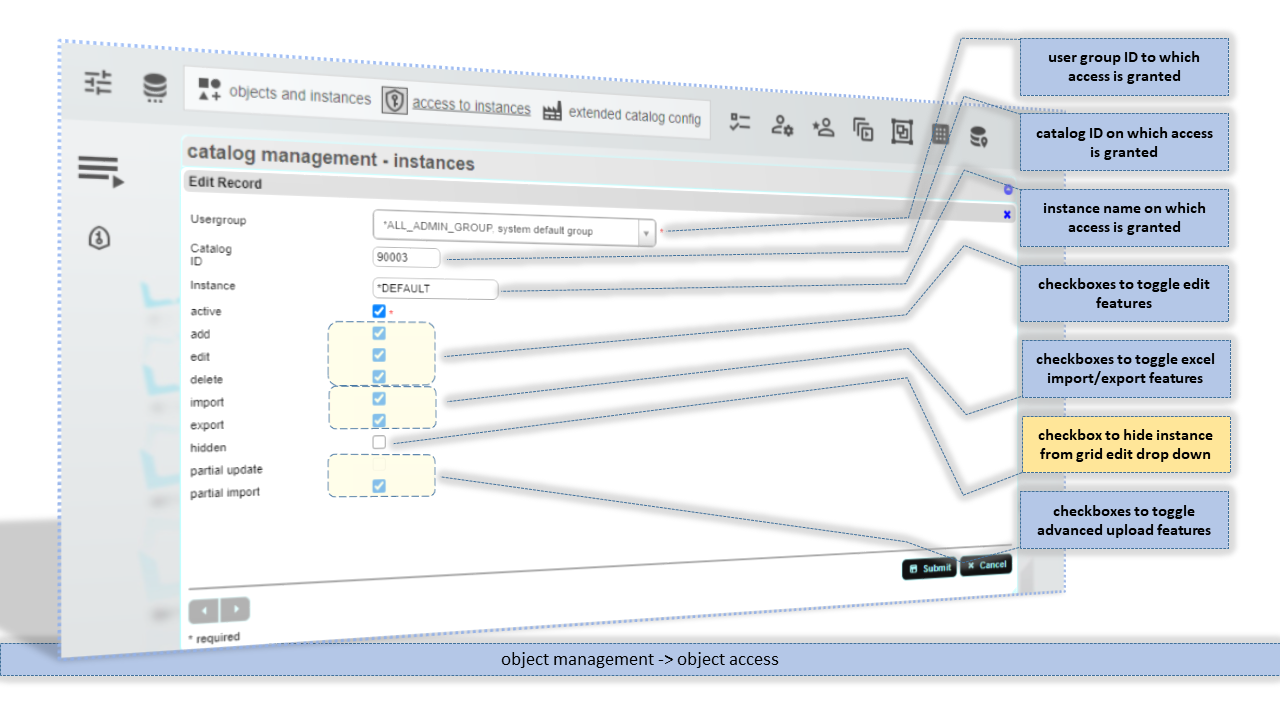
Usergroup
ID of user group to which access is granted. It is recommended to grant access only to user groups and not to single users (represented by it's self-referencing-group - single user group). There are special system groups that can used to grant access. See system constants for details.
Catalog ID
ID of catalogobject on which access is granted to the selected usergroup.
Instance
ID of the instance of the catalogobject on which access is granted to the selected usergroup.
add
Checkbox to grant add record rights. When add is true then the plus-icon appears in the edit grid
edit
Checkbox to grant change record rights. When edit is true then the pencil-icon appears in the edit grid
delete
Checkbox to grant delete record rights. When delete is true then the rubbish bin-icon appears in the edit grid
import
Checkbox to grant Excel import rights. When import is true then on the left side the upload-icon appears on the edit page. Excel import is a full replace of the tables' content. Be careful with this option.
export
Checkbox to grant Excel export rights. When export is true then on the left side the download-icon appears on the edit page. If the exported database object name is longer then 31 characters then it is truncated to fit Excel requirements. In those cases users can see different sheet name then database object name in the opened document.
hidden
Checkbox to hide a table from the standard dropdown list on the grid edit page. Instances that should be only accessable via transactions or lookup feature can be set hidden.
partial update
Checkbox to grant Excel partial update rigths. protected - for future use
partial import
Checkbox to grant Excel partial import rigths. When “partial import is true then on the left side the partial uppload-icon appears on the edit page. With Excel partial import only the records from the uploaded Excel sheet are affected by delete/insert operation.
niota-docs/niota_grid_config_catalog_access.txt · Last modified: 2025/07/17 14:11 (external edit)