
User Tools
Sidebar
niota-docs:niota_grid_config_connection
This is an old revision of the document!
Table of Contents
configure grid connection
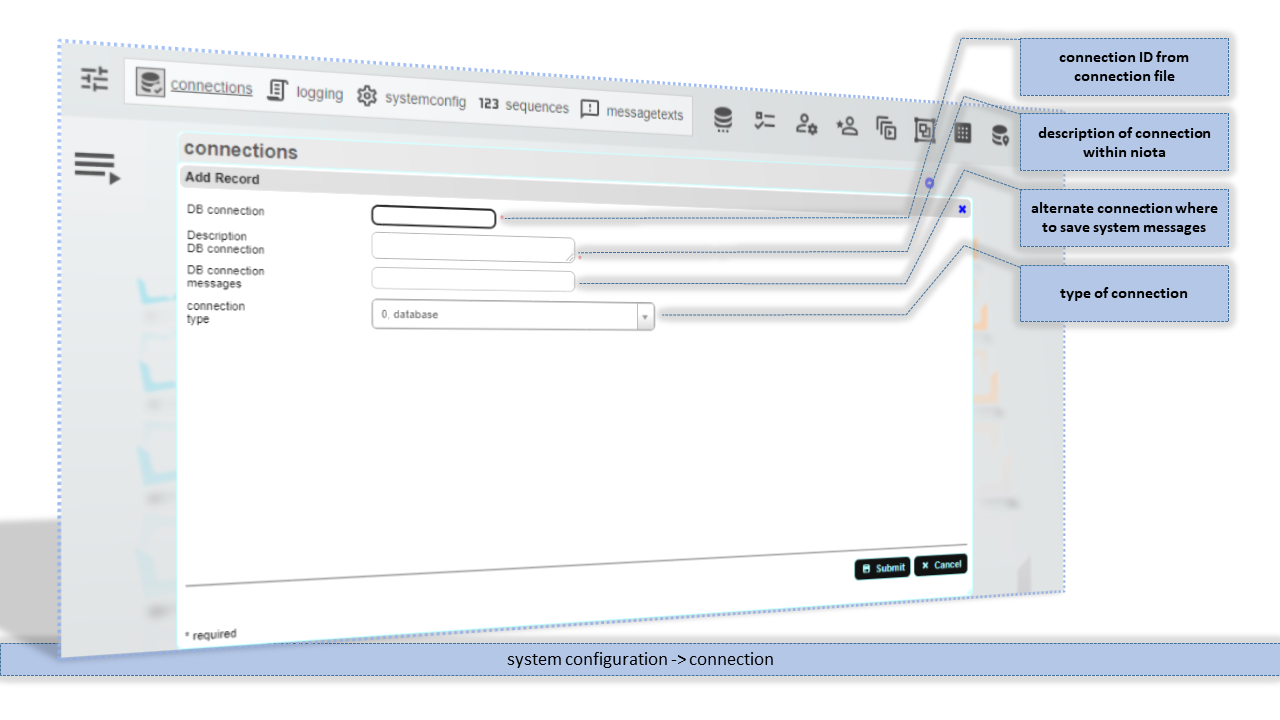
With this feature you can configure an existing database connection or webservice connection from connection.php for usage in user interface.
- Add/edit a record.
- enter valid values for fields listed below
DB connection
Name of a valid database connection or webservice connection defined in your connection file.
Description DB connection
Description of this connection. This description is used only in the admin pages. In the grid pages the description from connection file is used.
DB connection messages
A valid database connection where system messages are written and where the will be retrieved for user interaction. If you don't want to save messages/display messages at all then leave this column empty.
If you want to save messages in a database, a table etx_message in the given structur must exist in the database where this connection points to.
connection type
Choose type of this connection from pulldown list.
niota-docs/niota_grid_config_connection.1639930959.txt.gz · Last modified: 2025/07/17 14:11 (external edit)