
User Tools
Sidebar
niota-docs:niota_grid_config_user
This is an old revision of the document!
Table of Contents
configure user
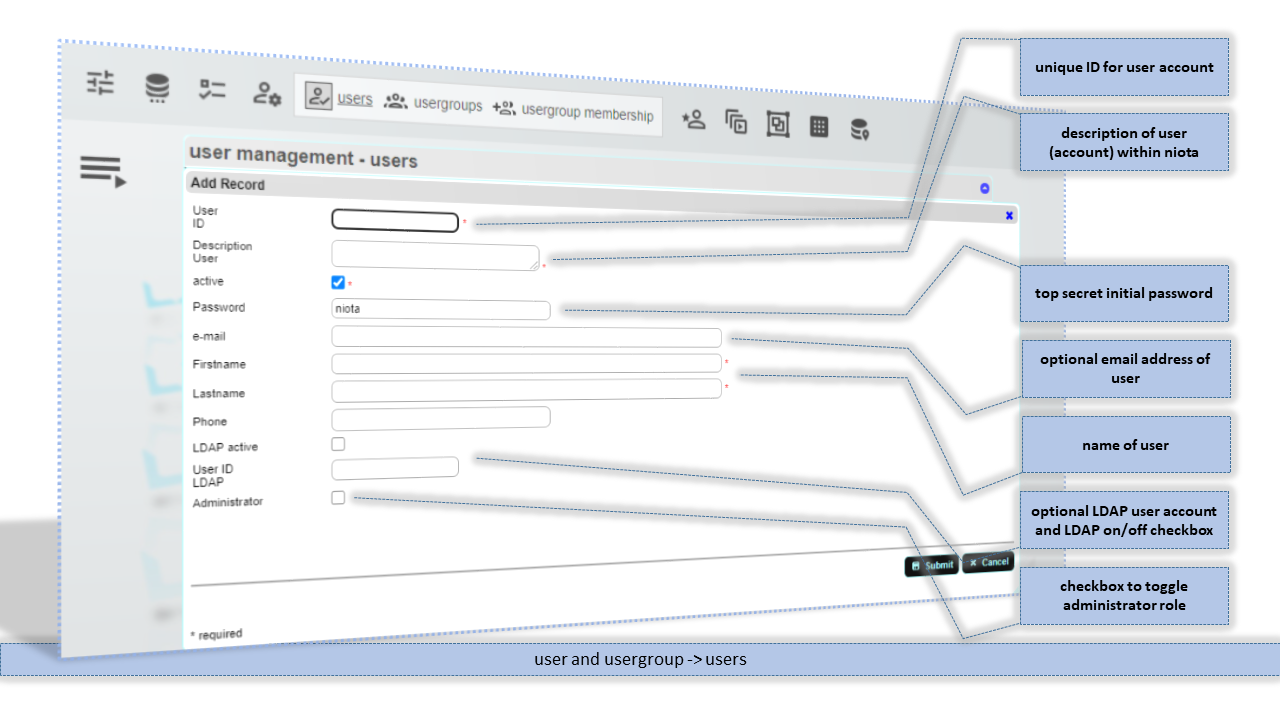
User ID
Unique ID for this user account. In case you want use LDAP as authentication method the user ID must match with the LDAP user ID on your LDAP server.
Description User
Description for this user account within niota.
Password
Password for this user account. No password rules applied.
E-mail address for this user account.
Firstname
Firstname for this user account.
Lastname
Firstname for this user account.
Phone
Phonenumber for this user account. Just for documentation purposes.
LDAP active
Checkbox to activate LDAP authentication for this user account. For correct authentication the LDAP connection must be set up in your connection file.
User ID LDAP
Alternate user ID for LDAP authentication. Not used
Administrator
Checkbox to assign administrator role to this user account.
niota-docs/niota_grid_config_user.1641401580.txt.gz · Last modified: 2025/07/17 14:11 (external edit)